
BetterPhoto.com
EMAIL: PASSWORD:
remember me:     


Photography Galleries    Featured Photographer    Raymond Ao - Beginning Photoshop for Photographers


Ray Ao - Water Lily Bud Sharpened
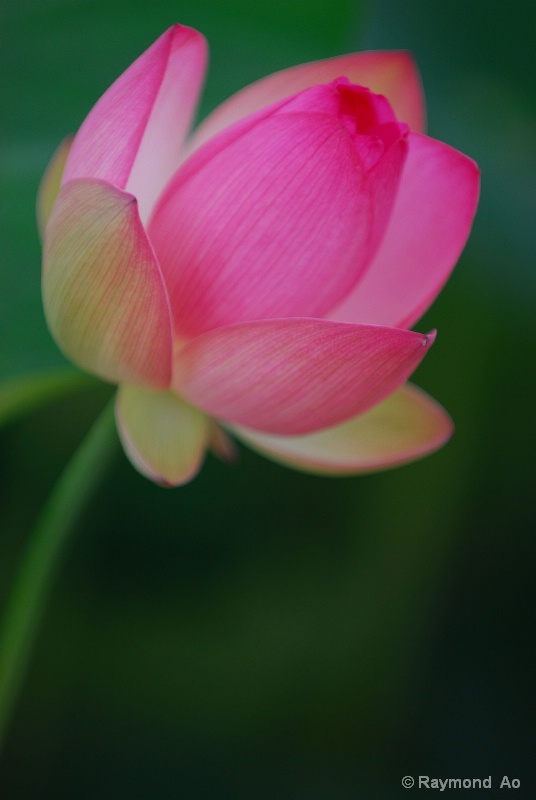


Ray Ao - Water Lily Bud Sharpened
Description: First I used the Unsharp Mask from the Filter menu to sharpen the image. Data used:
Amount = 200%, Radius = 2.0 pixels, Threshold = 0. Any more than that would result in halo around the edges. But the sharpening effect was minimal.

Then I used the Smart Sharpen, and the result was a little more visible. That is the image I am submitting. The data used is as follow:

In the Smart Sharpen Dialog Box, I used Advanced
Setting = Default
Sharpen - Amount = 200%, Radius = 3.8 pixels, Remove = Gaussain Blur (did not seem to make any difference as to which one I chose). Could not access the Angle.
Shadow – Fade Amount = 50%, Tonal width = 50%, Radius = 50 pixels.
Highlight - Fade Amount = 50%, Tonal width = 50%, Radius = 50 pixels.

It seemed to me that making Changes to the radius under the Sharpen submenu provided the big effect on sharpening the image. The Amount under the same submenu also contributed to the effect somewhat, the rest did very little. I used 50% etc. ju
Uploaded on 12/6/2009 9:07:23 AM


Made with Nikon D200 Digital SLR Camera
Learn how to make better photos with this camera!

To Discuss Sign In or become a BetterPhoto member.
Sign in to make photo a Favorite

© Raymond K. Ao
Join the photo sharing fun!

Sign in to make photographer a Favorite

Copyright for this gallery photo belongs solely to Raymond K. Ao. Images may not be copied, downloaded, or used in any way without the expressed, written permission of the photographer.


Copyright © 1996-2013 BetterPhoto.com, Inc.® All Rights Reserved.