|
|||
|
|
BetterPhoto Q&A
To participate in the Forum, become a BetterPhoto member or Sign In.
|
||||||||||||||||||||||||||||||||||||||||||||||||||||||||||||||||||||||||||||||||||||||||||||||||||||||||||||||||||
|
Aldo Tristan member since: 12/4/2001 |
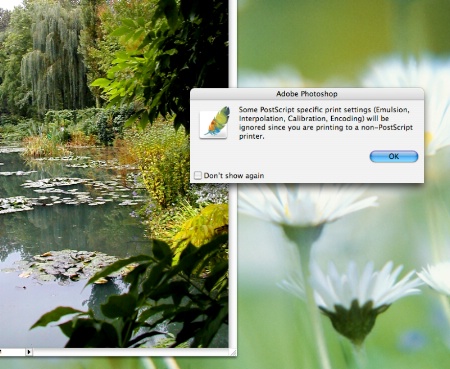
Photoshop Printing Warning
Best Regards, 9/25/2008 7:03:48 AM |
|||||||||||||
|
|
||||||||||||||
|
Richard Lynch member since: 6/12/2005 |
You are most probably set up wrong and making the wrong choices in both color management and when you go to print. Printing can be tricky between installing and selecting the right drivers, calibrating your monitor, and making color management choices that make sense. It is a big issue, which is why I teach a 4 week course in color here at better photo. I've also blogged about it recently: The Psychology of Color Management and Calibration I think you need to start by having the right drivers installed for printing, as if you are choosing the right one, it will know the printer is not postscript. That will not solve the color management problems which will have to be addressed separately. Does that help? 9/26/2008 7:33:40 AM |
|||||||||||||
|
|
||||||||||||||
|
Aldo Tristan member since: 12/4/2001 |
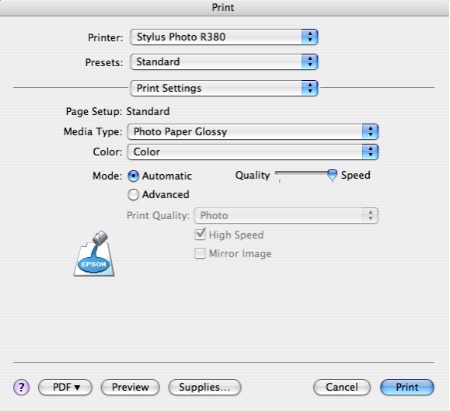
I downloade the drivers from Epson website and restarted the computer and I still get the same warning message. Aldo 10/8/2008 8:41:51 AM |
|||||||||||||
|
|
||||||||||||||
|
Richard Lynch member since: 6/12/2005 |
Downloading and installing are good steps. Are you sure you are using the printer driver you installed? Can you display the Print dialog here? Richard Lynch 10/8/2008 9:26:45 AM |
|||||||||||||
|
|
||||||||||||||
|
Aldo Tristan member since: 12/4/2001 |
Thanks, Aldo Tristan 10/13/2008 8:28:04 PM |
|||||||||||||
|
|
||||||||||||||
|
Richard Lynch member since: 6/12/2005 |
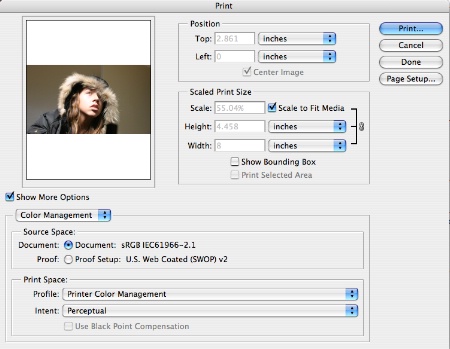
Aldo, Please click on the Color Management drop list, choose Output and take another screen shot. If you have checked boxes on that screen (this is where settings for emulsion, interpolation, etc., are), this may be the issue. Richard 10/14/2008 4:43:11 AM |
|||||||||||||
|
|
||||||||||||||
Oliver Anderson![]() member since: 11/16/2004 |
Richard, Downloaded the driver's for my buddys MAC and his new HP printer. (I'm a PC guy) So it presented quite a challenge....Getting it to USE the profile was a whole other problem but its using WAY less ink and the photos look great now. He was hesitant to let me do it and now he's a complete believer.
10/14/2008 2:13:44 PM |
|||||||||||||
|
|
||||||||||||||
|
Aldo Tristan member since: 12/4/2001 |
10/26/2008 10:13:01 AM |
|||||||||||||
|
|
||||||||||||||
|
Richard Lynch member since: 6/12/2005 |
You have to click on Color Management, but select Output as it changes the view of the screen. After the view changes, then take the screen shot. Richard 10/26/2008 10:39:41 AM |
|||||||||||||
|
|
||||||||||||||
|
Aldo Tristan member since: 12/4/2001 |
Aldo 10/26/2008 3:24:24 PM |
|||||||||||||
|
|
||||||||||||||
Carlton Ward![]() Contact Carlton Carlton's Gallery carltonwardphoto.com member since: 12/13/2005 |
Hi Aldo, I noticed you do not have use color calibration which is what you will set your profile to and it appeared you were printing from an sRGB file. I highly recommend that you take Richards class and get up to speed with color calibration and printing. I would also recommend that you print from your high res tif image and not a small res jpeg file. Good Luck - Carlton 10/26/2008 9:02:36 PM |
|||||||||||||
|
|
||||||||||||||
|
To participate in the Forum, become a BetterPhoto member or Sign In.
|
||||||||||||||
|
|
Copyright © 1996-2013 BetterPhoto.com, Inc.® All Rights Reserved.